
Custom Business Software
Manage your daily operations in one place.
We build custom software around how your team works.
Keep your records, tasks and workflows in one system.
Sound familiar?

The business runs on spreadsheets.
Several versions of the same file are in circulation. To find out which one is up to date, you still have to ask the person who maintains it.
Client conversations stay on staff phones.
To find out what was discussed, which price was quoted or what was promised, you have to reach the person who spoke to the client.
Late payments go unnoticed.
Expired packages, overdue installments and partial payments aren't visible in one place. You have to check individual records to see what needs following up.
You enter the same information more than once.
The client goes in a spreadsheet, the appointment in a calendar and the payment in another file. When something changes, each one needs updating separately.
Your software was built for everyone.
The menus are full of features you don't use. The step your business actually needs still happens in Excel or over messages.
You keep messaging the team for updates.
Who’s handling the task? How much is done, and who needs to respond next? You have to keep asking to find out where things stand.
We build the system around how your business works .
First we learn how you work, then we design the screens and features around your needs.
These screens illustrate example workflows. Features and integrations are defined in your project scope.
Today
Tue 13
12
Appointments
7
Completed
$1,240
Outstanding
48
Active clients
Client progress
Week 7 / 12Emily Carter
12-week programme
kg
77.1
−4.9
Waist
84 cm
−6
Body fat
24%
−3.2
Today's schedule
View all →- 09:00EEmily CarterFollow-upRoom 145 minConfirmed
- 10:30MMichael ReedFirst consultationRoom 260 minPending
- 13:00SSarah WhitfieldFollow-upOnline30 minConfirmed
- 15:30DDaniel BrooksMeasurementsRoom 145 minConfirmed
Outstanding payments
- SSarah Whitfield$6203-month planOverdueRemind
- MMichael Reed$210Single sessionPendingRemind
On today
- DDana Whitfield6 sessions78%
- CChris Malone4 sessions56%
Talk to your own data
We can add a data assistant that lets you ask questions about your business records in natural language.
Example scenario. The assistant is scoped separately after reviewing data access and requirements.
Example questions
- Which channel books best?
- How many clients left last month?
- How many packages renewed this month?
You
Why did new client numbers drop this month?
Assistant
Reading the records
Examples by industry
These are example scenarios.
We define the features together based on your business needs.
Dietitians
Clients due for a follow-up are listed, with weight changes tracked on a chart.
Beauty salons
Remaining sessions, package renewals and staff commissions are tracked in one place.
Jewelers
Each repair is logged with a photo, and the customer is notified when it is ready.
Law firms
Hearing dates, case expenses and fees are tracked in the same case file.
Personal trainers
Client measurements and session history are kept together, with renewal reminders before a package ends.
Clinics
Consultation notes, test results and follow-up appointments are kept in the same patient record.
Small hotels
Occupancy, early check-in requests and room cleaning are tracked on one screen.
Real estate offices
Inquiries are matched with listings by budget and location, then assigned to an agent.
Pilates and yoga studios
Full classes have a waitlist. When a place opens up, the next member is notified.
Veterinary clinics
Pet owners receive automatic reminders when vaccinations or check-ups are due.
Accountants
Upcoming tax filing deadlines and missing documents are tracked for each client.
Loan brokers
Each application's bank and outstanding documents are tracked in one place.
Features
The features your business needs.
From client records to staff scheduling, we work with you to define the features you need and build them into one system.
Records and tracking
Bookings and calendar
Planning by staff, room or resource; free slots and conflict checks.
Client records
History, notes and documents in one place, with records tailored to your clients or patients.
Payment and invoice tracking
Paid, pending and overdue amounts on one screen.
Packages and memberships
Session packs, memberships, remaining credits and renewals.
Staff and shifts
Working hours, shifts and task assignments.
Messages and reminders
Booking, payment and membership reminders sent through the agreed channels.
Reports
Revenue, occupancy, sales, collections and operations reports.
Access permissions
Control who can view each record and what actions they can take.
We connect payment, e-invoicing and messaging services to your software through their APIs. We confirm what each integration can do based on the chosen provider's capabilities.
Automation
Automate routine tasks.
We build automations that send reminders, update records and prepare reports around the way your business works.
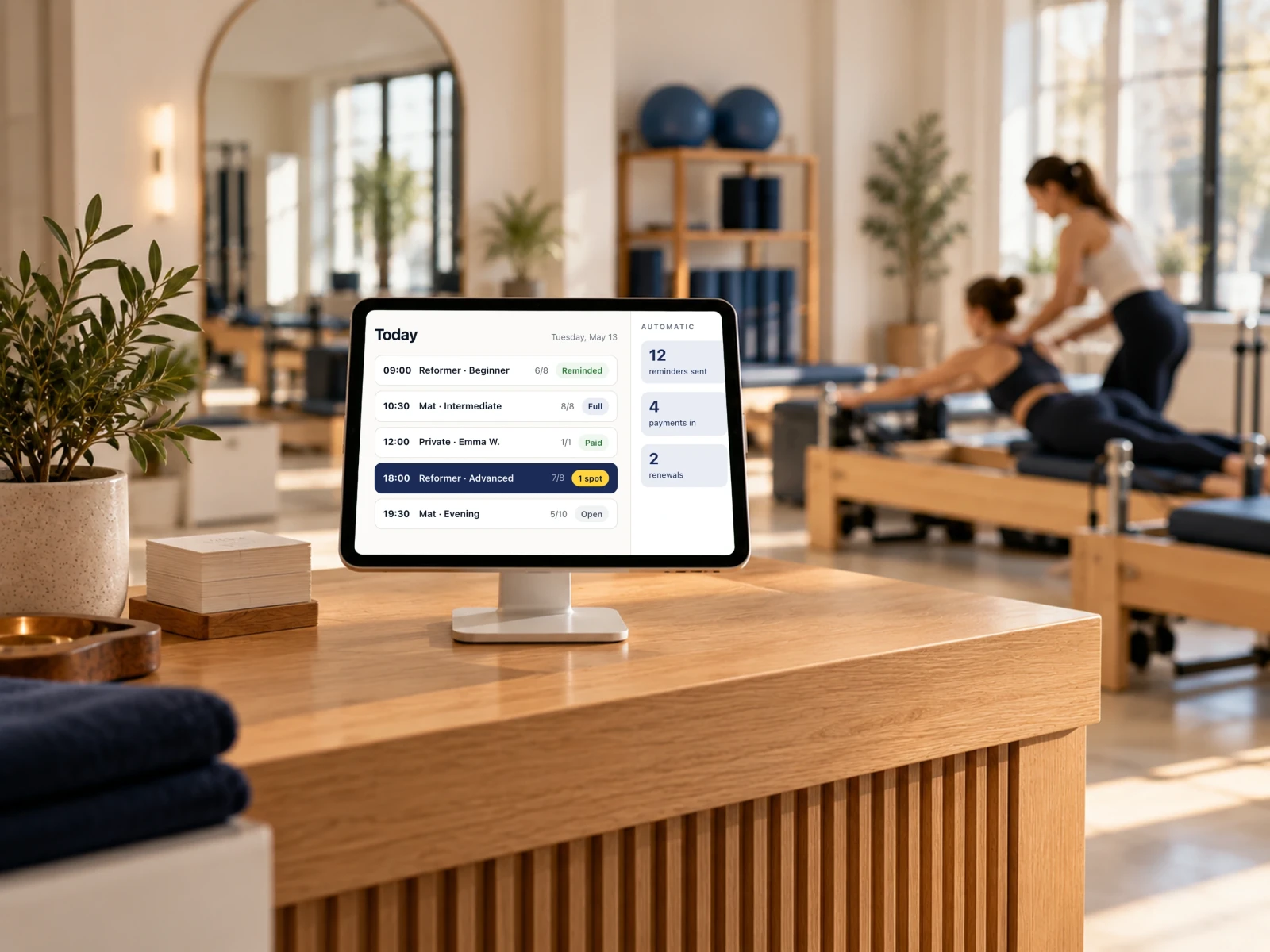
- 07:30Today's planEach staff member's appointments and tasks are ready to view at the start of the day.
- 09:00Booking reminderClients receive a reminder before their appointment. Their confirmation updates the booking record.
- 11:20Online bookingA client chooses an available time, and the appointment is added to the calendar.
- 14:00Payment trackingPayment updates from your provider are automatically recorded against the relevant client.
- 17:30Package renewalClients with packages nearing the end are identified, and the responsible staff member receives a renewal reminder.
- Mon 08:00Weekly summaryA summary of the week's sales, payments received and appointments is emailed to you.
These are example workflows. We agree on the timing, rules and service integrations with you.
Switching over
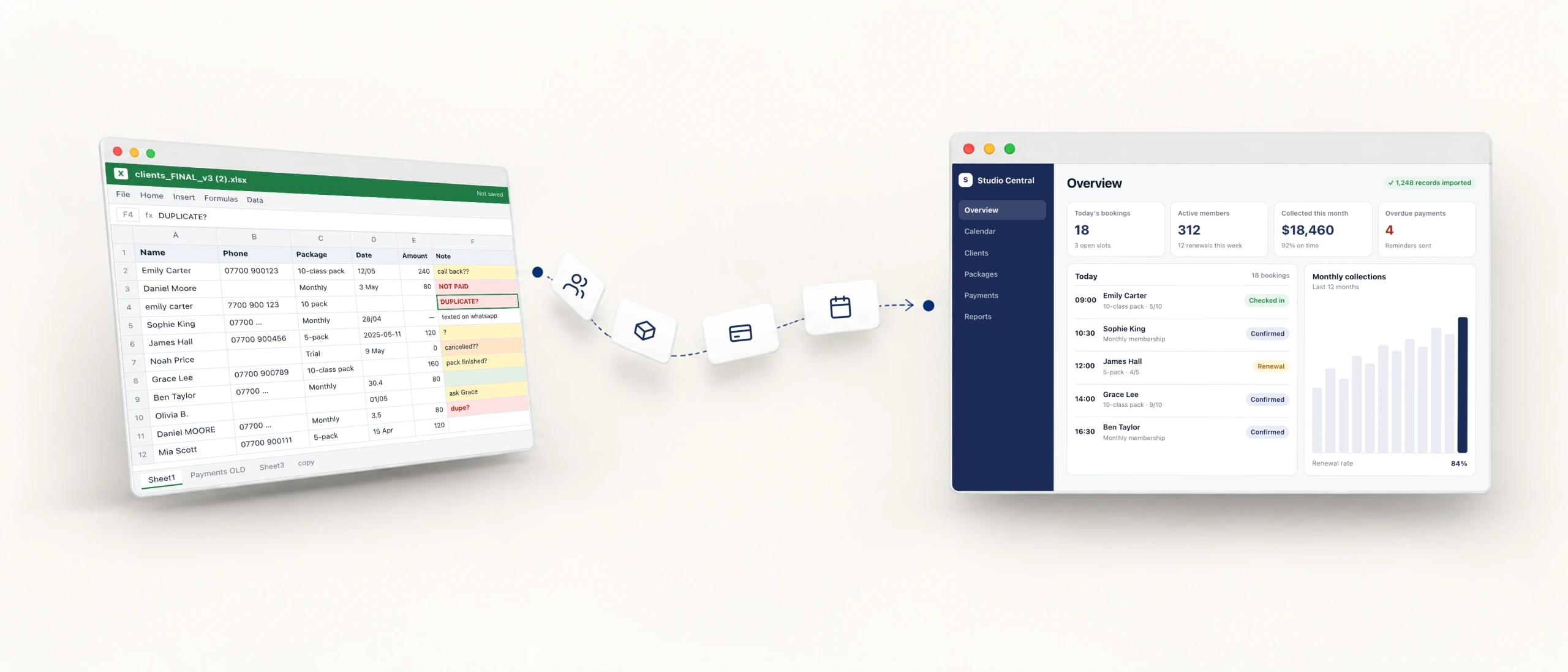
Bring your existing records into the new system.
We review your existing data with you to establish which records can be transferred.
We agree on the migration scope and transition plan before work starts.
- 1
We transfer your records
We transfer the agreed records into the new system and check their accuracy with you.
- 2
We prepare your team
We show your team how to handle their daily work in the new system, using examples from their own tasks.
- 3
We help you make the switch
We plan the transition and provide support for issues during initial use. Your proposal sets out the support period and scope.
Process
Four steps from first message to go-live.
We set the dates for the first test version and go-live based on the project scope and share them with you before work starts.
- 1
Step 1
We learn how you work
We review your day-to-day work with you, including the tools you use and the tasks that take up too much time.
You getYour needs and current workflow - 2
Step 2
We define the scope
We agree on the features, screens, required integrations and any data migration. Your proposal includes the price and delivery schedule.
You getScope, quote and schedule - 3
Step 3
We build and test with you
We share working versions for your team to try, then refine the software based on their feedback.
You getA test version every two weeks Step 4
We get you ready to go live
We complete the final checks and train your team. If data migration is part of the plan, we complete it before the switch.
You getA system ready for use
Let’s plan the right software for your business.
We’ll look at what’s slowing your team down and what you need.
Then we’ll define the scope, timeline and budget together.